I built an X unfollower tracker because I got petty
XFlog is an open-source, self-hosted X unfollower tracker with follower history, interactions and saved threads. Why I built it, and how it works.

Update, November 9, 2026: This post and its demo show XFlog 1.0.0. Newer versions draw one Constellation star per recorded action and share a time range across the timeline, Journal and readings. See what changed in the XFlog activity timeline.
I admit, I am petty. I got sucked into the “let’s connect” crowd on Twitter. People follow each other, the follower count goes up and, for a while, it feels like something is happening. Then some of those gains disappear. Sheesh!
Of course, I started wondering why. Did I say something annoying? Did someone follow me, get the follow back and leave to improve their following-to-followers ratio? Was I taking a number on a website a little too seriously? Quite possibly. XD
The annoying part was not having enough information to separate those possibilities. I could see a count change, but I wanted the history behind it. If someone from the let’s-connect crowd had unfollowed me, I wanted to know so I could decide whether to unfollow them back. I wasn’t approaching this with a particularly noble research question. LOL.
Being me, I ended up building a tracker. I called it XFlog, short for X Follower Log. It is an open-source, self-hosted X unfollower tracker and activity journal. It started with follows and unfollows, then grew to include interactions, paid-subscription events, saved conversation threads and a few different ways to look at the people in that history.
The code is on GitHub at aatbit/xflog. You can run it locally or host it yourself. There is an offline demo too, so you can see the interface before getting anywhere near API credentials or credits.
A 25-second look at the built-in demo. Silent, with captions; all people and activity shown are sample data.
The number was only half the question
The original irritation was straightforward: I had followed people through those connection threads, and some of the apparent connections were disappearing. But once I started thinking about what I wanted to see, an unfollower list alone felt incomplete.
Suppose a name appears in the log. Have we actually spoken? Did they reply to something I posted? Have I liked their work? Have they followed, left and returned before? A bare profile and an Unfollow button don’t answer much of that.
X search can help when you know the query to write. I wanted a more direct route to the interactions I had recorded with one person. Open the person, see the history, then follow the conversation if I need the surrounding context. Less searching for something I vaguely remember reading.
This is a familiar way for a project to start for me. TabMate came out of the irritation of repeatedly finding and moving browser research. XFlog came out of a different irritation, with considerably less dignity involved. The common bit was wanting a tool I could use for a specific question I kept having.
A journal with people in it
XFlog keeps the recorded history in a local SQLite database. The browser gives you two main ways to explore it: Constellation and Journal. Both work from the saved activity; switching between them doesn’t change what the instance records.
Constellation puts people along a navigable strand. You can move through the loaded history, zoom and select a person to see the current recorded signal. One person can have several events behind that point. The connections trace the recorded sequence; they aren’t a diagram claiming that those people know each other.
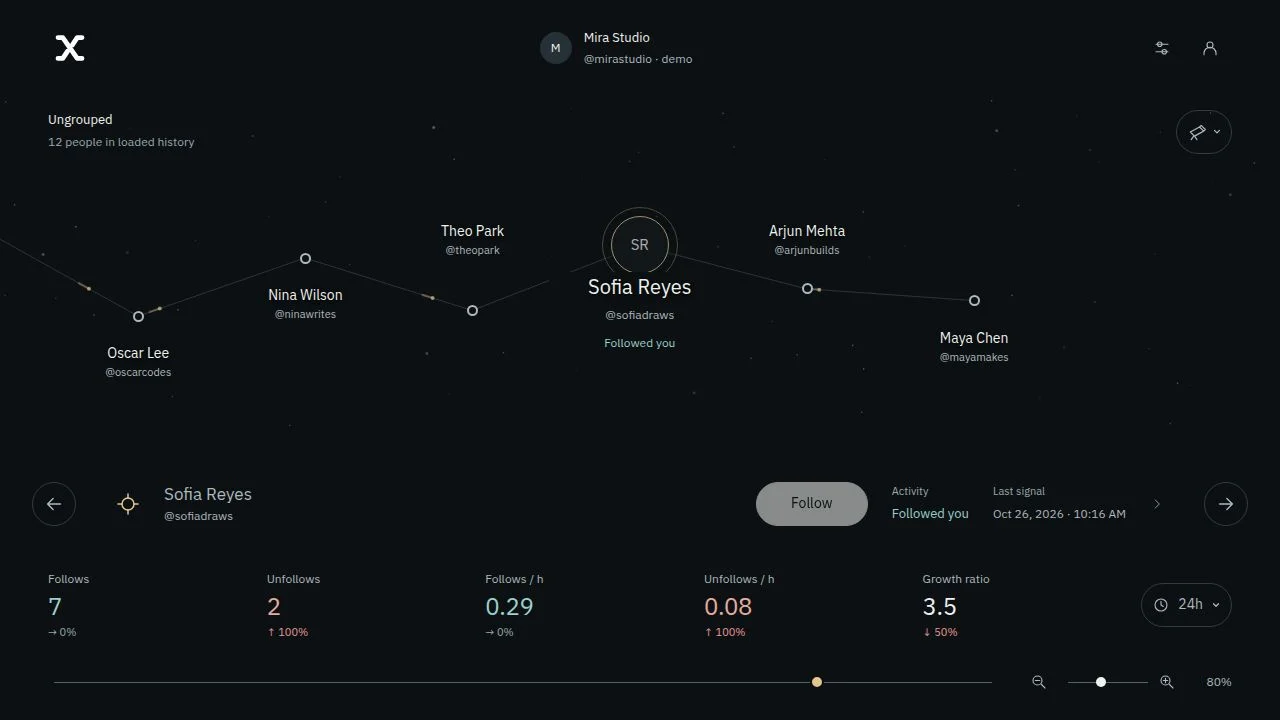
Constellation in the offline demo. The account, people, dates and activity numbers in these screenshots are sample data, not my follower history. Open an image to view it full size.
Journal gives you the more familiar chronological list. It shows individual events, so repeated appearances of the same person remain visible. You can filter gained and lost activity, and switch to paid subscribers when that is what you want to inspect.
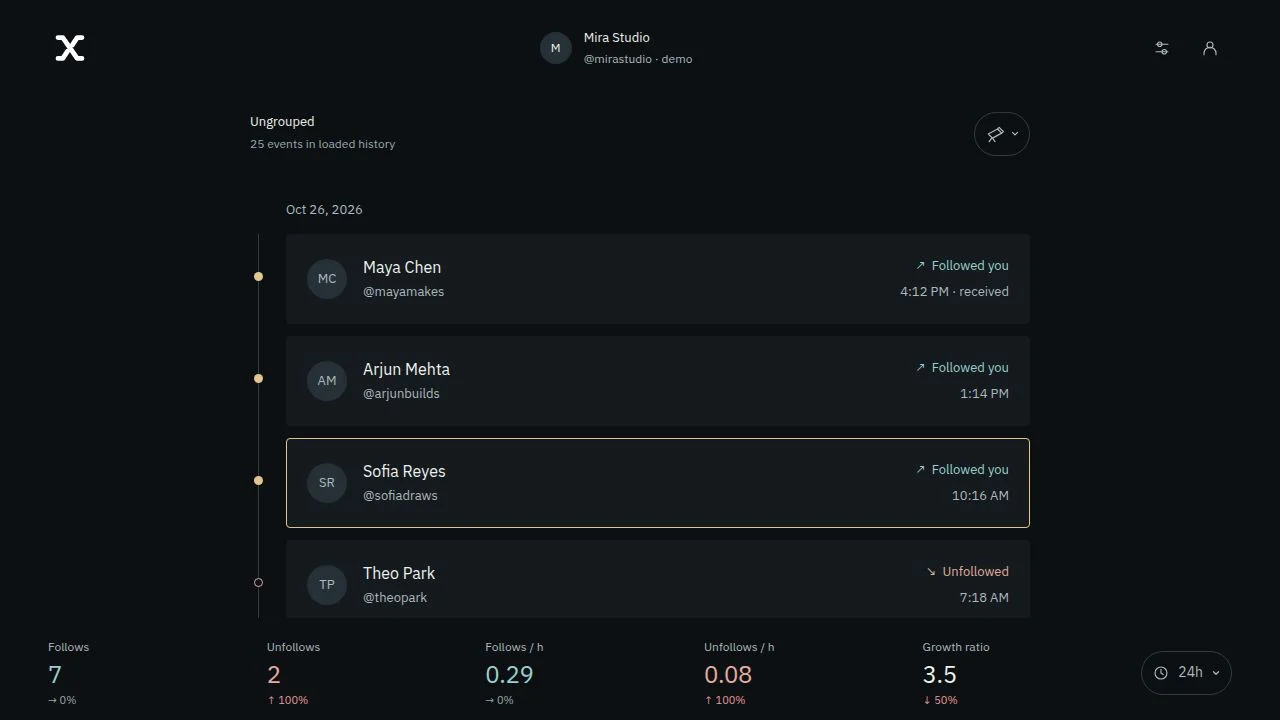
The same demo history in Journal. This is the view for reading the sequence of events rather than moving through people in the constellation.
I wanted both. Sometimes I want to move around and recognize a name. Sometimes I just want the rows in order. Neither needs to involve a new request to X merely because I changed how I was looking at already-saved data.
What XFlog can track
The follower log records incoming follows and unfollows. Paid-subscription tracking adds new subscribers and expirations. Those are separate choices, so someone interested only in follower changes doesn’t have to enable subscription events as well.
Interaction history has more choices. You can enable replies, mentions, quotes and reposts received, likes received, your own likes, and your posts and replies. The last option includes standalone posts too. That matters when deciding what you want the instance to receive, rather than assuming every event will be a conversation with another person.
These switches are in Profile. Interaction tracking is off by default, and you choose the categories you want. Followers are enabled in the initial preferences, while paid subscriptions, notifications, follow actions and optional name resolution start off. A fresh database leaves collection paused until you explicitly start it.
For a person in the recorded activity, Interaction history brings the saved entries together. That can include someone who never appeared in the follower log. A person replying to you doesn’t have to follow you first, and I didn’t want that useful interaction excluded simply because there was no follow event attached.
There are limits to the association. For outgoing replies or quotes, XFlog needs X to supply the other person’s identity or the referenced post before it can connect the activity to them. It doesn’t fill the gap with a guess about who you were talking to.
The immediate use for me is simple: before deciding what to do with a name, I can look at the history I have with that person. A follow change and an exchange about something I built are different pieces of information. I wanted access to both.
Keeping the conversation around
A recorded reply is useful, but sometimes its text makes little sense without the conversation. XFlog can load and save a thread from a saved interaction when you ask for it. It doesn’t automatically fetch a full conversation for every event arriving in the log.
The first thread load can make X API reads. Afterward, reopening that saved copy reads the local database. Load more requests another page; Refresh checks X again. Both are explicit actions, and the saved copy has a checked time so you can tell when it was fetched.
That arrangement suits how I want to browse. I can look through the interactions I already have, then choose which conversation deserves a fuller read. I don’t need a background process enthusiastically downloading every thread just because it can.
When new tracked posts match a saved conversation, XFlog can add them to that local thread without fetching the whole conversation again. Unseen replies, edits or deletions still need a new read from X. A saved thread is a dated copy of what was available, and it can include other participants or be incomplete.
I like keeping the distinction visible. “I have this conversation saved” and “I have just checked its latest state” are useful things to know separately, especially when reopening something after a while.
The “haven’t I seen you before?” view
Previous encounters is probably the group closest to the original reason I built this thing. It uses the saved history to distinguish a first appearance, someone seen before, and someone who followed again after a recorded unfollow.
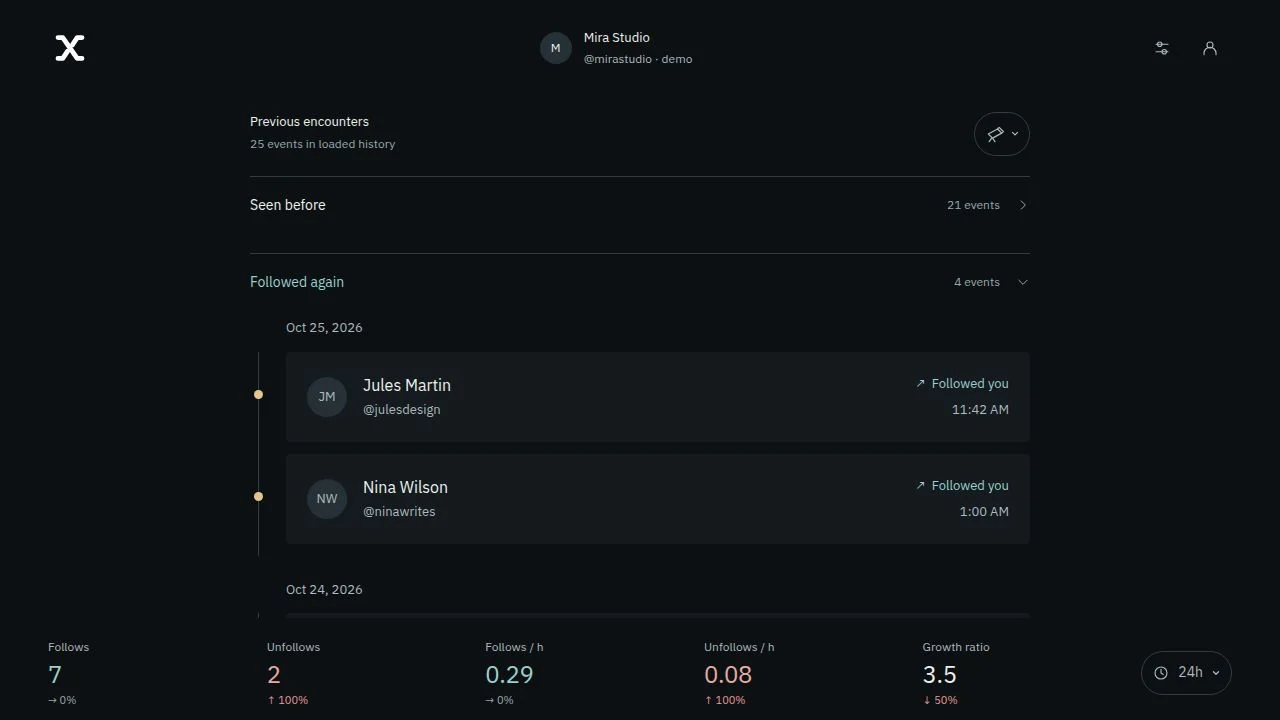
Previous encounters applied to the demo journal. “Followed again” describes a recorded sequence; it does not explain anyone’s reason for returning.
That last qualification is fairly important. A follow, an unfollow and another follow can be a real sequence in the database. It still doesn’t come with a field saying, “This person is definitely manipulating their ratio.” I can inspect the sequence without pretending the app reads minds.
The other groups cover activity type, account size, account age, verification and profile location. You can enable the ones you want and choose a lens for the loaded history. In Journal they become collapsible sections; Constellation gives the groups their own connections and sections.
The profile-based groups use details delivered with events while those groups are enabled. They don’t launch extra profile lookups just to make every field look complete. Missing information stays Unknown. Account size or verification describes what was recorded, rather than a fresh check every time you open the view.
Location is the person’s profile text, tidied where a clear alias can be recognized. It isn’t a verified address. Previous encounters checks the full saved log, but “first appearance” still means first in that log. It doesn’t mean the first time someone ever followed you, and a gap in recording can hide a return sequence.
A different ratio from the one that annoyed me
The activity readings show gains, losses, hourly rates and a growth ratio for the chosen period. You can change the period independently of the journal filter or constellation zoom. The readings use the full saved log for that period, rather than counting only the people currently visible on screen.
There is a small naming trap here. The growth ratio is recorded gains divided by recorded losses. In the demo screenshot, seven follows and two unfollows give 3.5. It is not the following-to-followers ratio I was complaining about at the start.
The app also compares the selected period with the previous equal-length period. Those changes help put an event in context, but the underlying numbers remain recorded activity. They are not a claim about the current total displayed on your X profile.
Similarly, the readings use when XFlog received the events. Event time is stored separately when the provider supplies it. If it is missing, the interface can show the received time without inventing an exact time for the original action. You can see that distinction in the demo journal’s “received” labels.
Yes, there is an Unfollow button
That was part of my original motivation, so leaving it out would have been rather funny. XFlog has an optional Allow Follow/Unfollow setting. It starts off, and enabling it requires the appropriate user authorization and permissions.
When enabled, the app checks the relationship for the selected person before presenting an available action, then checks again before changing it. Unfollow asks for confirmation. Scrolling through the constellation doesn’t fire off a relationship request for every name passing the center; the check waits until movement settles.
There is no automatic revenge loop in this workflow. I open a person, inspect what is recorded, and decide whether to act. The offline demo cannot perform those actions. Relationship checks can use API credits even if I look at someone and never press Follow or Unfollow, which is another reason the option is separate from simply browsing local history.
Notifications are optional too. They can show in-app notices and browser alerts with permission while the page is open. Closing the page doesn’t leave a desktop notification service running. I wanted the settings to say what they actually control.
An alternative to other social media trackers?
There are already products in this space. Looking at their current product pages, the overlap is clear, but so are the differences in scope:
| Tool | Relevant features described on its product page |
|---|---|
| Circleboom | Follower and following management, audience and post analytics, account search, monitoring and post planning. |
| Fedica | Unfollower history, accounts that don't follow back, follow/unfollow charts, exports and email alerts. |
| SocialDog | Follower filtering, acquisition and retention analysis, plus scheduling, social listening and account-management features. |
| XFlog | A self-hosted X event journal with follower and subscription changes, selected interactions, saved threads and person-focused browsing. |
If your main need is a history of changes and interactions around your own X account, XFlog is an alternative worth looking at. You keep the application and database yourself, choose the activity you want, and can inspect or change the code. It is Apache 2.0 licensed.
If your workflow needs scheduled publishing, team account management, broad social listening or several social networks in one dashboard, look carefully at the products offering those features. I haven’t built that entire collection into XFlog, and self-hosting a journal doesn’t give it the capabilities of a larger suite.
I also wouldn’t compare costs by writing “open source = free” and stopping there. Those products package access and services in their own ways. With XFlog, you take responsibility for the installation and bring your own X developer access. Whether that is preferable depends on what you want to run and maintain.
The API part still costs money
XFlog uses X’s activity subscriptions and a persistent HTTP stream for the events selected by the operator. It isn’t scraping the interface or repeatedly downloading a complete follower list. The X Activity quickstart explains the subscription and delivery model.
Live use requires a developer app, the required access, and your credentials. The installer expects an app bearer token and an OAuth 2.0 user access/refresh pair, plus the client settings needed for renewal. Its setup instructions distinguish those from the OAuth 1.0a token-and-secret pair shown elsewhere in the developer console.
X’s event pricing and API pricing are separate from the cost of running this application. Different selected events and extra reads can incur charges. Profile lookups, relationship checks and loading more conversation posts can also add usage. Set the provider’s spending limit and check automatic top-ups before live use; the local activity counters are not a billing cap.
The layout controls, groups, filters and statistics use saved records without extra X requests. Optional name resolution does make user lookups, then caches the result. That is a different choice from grouping the profile information already delivered with an event.
I have written about self-hosting infrastructure before. Having a container on my machine gives me control over that container and its data. It doesn’t remove the external service’s access requirements or bill. The offline demo is the route for exploring XFlog without any X requests.
Trying it without connecting your account
The repository README has the full setup. The interactive installer supports Docker and native Linux. Run it as your regular user, and choose a new installation directory. To inspect the script before running it:
curl -fsSL https://raw.githubusercontent.com/aatbit/xflog/main/install.sh -o install-xflog.sh
less install-xflog.sh
bash install-xflog.sh
Choose the install method and port. For the offline demo, leave the app bearer token blank; the installer skips the remaining X credential questions. Open the local address it gives you and choose Explore the demo. The screenshots here came from that mode in an isolated local instance, with no X credentials configured.
For live use, follow the README’s credential and permission steps, configure the account, choose the activity, and explicitly start tracking. Saving preferences doesn’t restart a paused collector. On an existing installation, the saved running/paused choice survives restarts, so pause deliberately if you want collection to remain stopped.
History stays in SQLite. Keep the database and backups private: the database can contain the saved token pair used for automatic renewal as well as activity. If you put the app on a VPS, use HTTPS and a browser password, with its application port kept private. The Caddy and Docker guide explains the shared-network arrangement I use for services behind a proxy.
Developers can also use XFlog as a Python library. The core runtime and history services are usable without installing the optional browser interface. The README includes the context-manager example and explains which calls are local reads and which can make X requests.
It remembers what it records
Installing XFlog today won’t recover the people who unfollowed you last week. Interaction history also starts with activity collected while tracking is running. Interruptions appear in connection history, and events missed during those gaps cannot simply be reconstructed afterward.
That limits the conclusions I can draw. An empty interaction history means I don’t have recorded interactions there. Someone appearing for the first time means first in my saved log. Neither is proof that we have never crossed paths on X.
The same goes for the question that started all of this. I can keep a record of a follow changing, inspect the available interactions and see repeated appearances. I still don’t get a reason supplied by the person who left. Maybe it was a ratio game. Maybe they didn’t enjoy my posts. Maybe I never find out.
I am not going to finish this with a story about learning to stop caring about follower counts. I cared enough to build software around the annoyance, which should settle that question. 😄
What I have now is a place to look when a name makes me curious, and an option to act after looking. If you have wanted the same sort of record, XFlog is on GitHub, with the demo and installation instructions ready to try. That is the project. The pettiness came first; the journal followed.