One person, three events: fixing XFlog’s activity timeline
See how XFlog’s self-hosted X activity timeline keeps repeated follows, unfollows and interactions visible, with matched screenshots from 1.0.0 and 1.0.10.
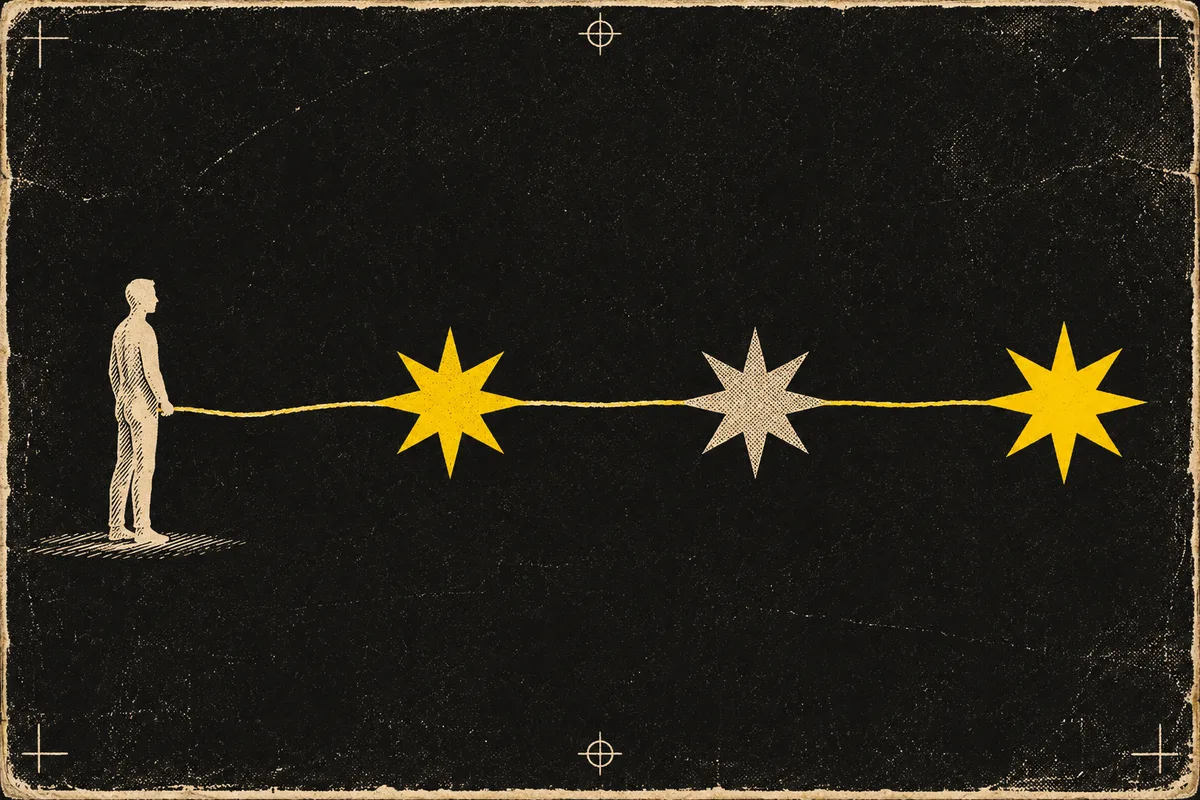
I built XFlog because I got petty. I got into those “let’s connect” threads on Twitter, saw the follower count go up and then watched it come back down. Well, who left? Did we ever actually talk? Had this person followed me before? The number on the profile didn’t have a lot to say about any of that.
So I made a log. Then I made a view called Constellation, where you could move through the people in that log as stars. One person, one star. Made sense, right?
Now say the same person follows, unfollows and follows again. How many points should I see when I open a timeline to find out what happened? Three, I would say. How many did XFlog 1.0.0 draw for that person? One. XD
The events were still in the history. The readings could count them and Journal could list them. I had just made a view that compressed the very thing I wanted to see. The interesting part of the updates from 1.0.0 to 1.0.10 is what happened once I stopped treating a person and an event as the same thing on screen.
XFlog is still the same open-source, self-hosted X follower and activity tracker. The code is at aatbit/xflog on GitHub. This is about what changed in the history you see after the events have arrived.
Same three events, two versions of XFlog
I ran two copies of the app, from the 1.0.0 and 1.0.10 tags. I gave their offline demos the same three synthetic records, an hour apart: Maya follows, Maya unfollows, Maya follows again. Same account identifier, three different event identifiers. All three fit within 24 hours.
Maya is a demo person here. No account was connected, no X API credentials were configured and no live event was collected. The only swap was the demo’s sample input; both screenshots show the actual release UI drawing it.
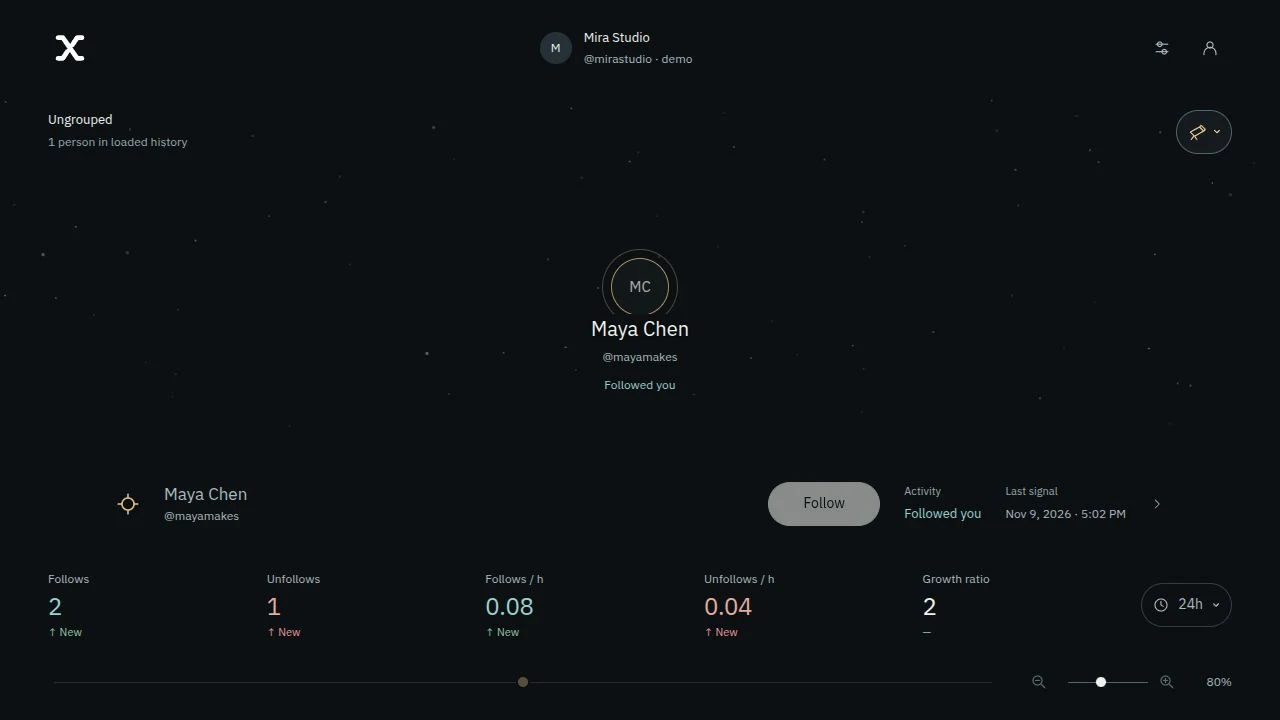
1.0.0: one star for Maya. The readings below already know about two follows and one unfollow.
The original star even exposes three recorded events in its accessible label. So this isn’t a case of the tracker throwing away two records on arrival. It loaded the three events and put one person on the strand. If you wanted a chronological list, Journal was already there. I wanted the visual timeline to let me move through that sequence too.
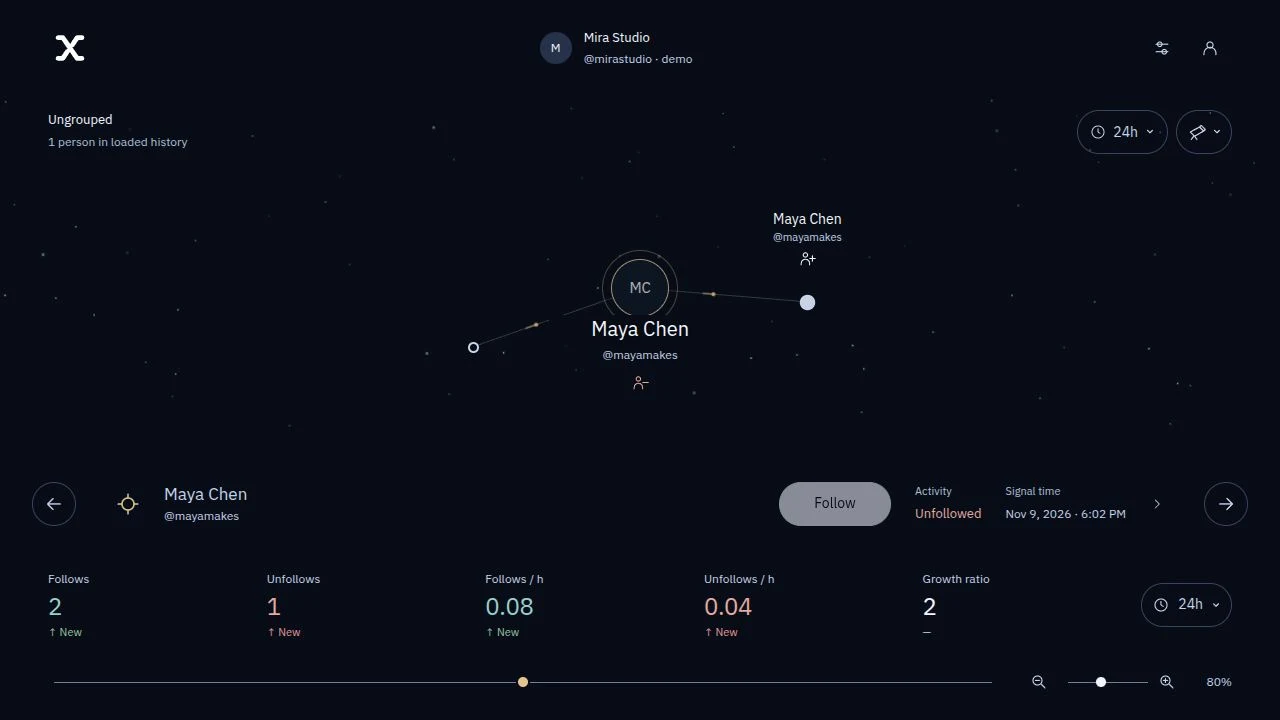
1.0.10: the same three records, with the middle unfollow selected. The upper-left hint still correctly says one person. Open either screenshot to see it full size.
The fun bit is that the count hasn’t changed. Two follows, one unfollow, growth ratio two. Neither screenshot shows two distinct followers gained. One person followed twice, and the second follow came after an unfollow. I can see why the readings add up that way without trying to reverse engineer the numbers.
What should a star stand for?
One point per person was a reasonable choice for an audience map. A person can have a handle, a profile and a whole interaction history. Why draw them ten times if I’m trying to find ten different people? The problem was calling that map a timeline and expecting to read it as a series of actions.
A follow and an unfollow by the same person aren’t duplicates. Neither are two separate follows on different days. A second delivery of the same event, on the other hand, should not get a second star. This is where the identifiers matter. The actor ID tells me who the record belongs to. The event ID tells me which action I am looking at.
In 1.0.6, Constellation started building its entries from distinct event IDs. It still uses the actor to display the person, and it still has access to their history. The visible entry is an action. I can click the unfollow without changing the fact that the two follow entries are the same Maya.
There is a second place where this matters: the timeline refresh. Say I’ve stopped on yesterday’s unfollow and another event comes in for that person. If the app only remembers who I selected, it can take me to the newer event while I’m reading the old one. The handle stays the same and the details change underneath it. Easy to miss, especially if I’m looking at the timestamps.
The refresh now preserves the selected event ID as long as that event is still in the view. If I change the filter or the event ages out of the range, the old selection may no longer be available. That’s different from taking me to a new action because the same person happened to do something else.
I also wanted the navigation to behave like that. The arrows move through recorded actions. Click an unselected star to center it; click the selected star again to open its details. The click-centering and zoom changes in 1.0.2 make moving around the strand easier. Having the correct thing under the cursor matters rather more than giving the cursor a nice journey to it. 😄
Three actions by one person
Once a star stands for an action, what should the number on a group badge mean? If I count the stars and get one number, then look at the badge and see another, I’d like a better explanation than “both are correct.”
In 1.0.6, group overviews still counted people. 1.0.7 changed the Constellation group badges and legend to count actions, with the number of unique people available in the tooltip and accessible label. The ungrouped hint in the screenshot says one person because it is explicitly describing people in loaded history. That’s a useful number too. It just shouldn’t pretend to be the size of the timeline.
For the example above, the ungrouped view contains three actions by one person. Split it by activity and there are two follow actions by one person and one unfollow action by one person. Add up the action counts and you get three. Add the people counts from both groups and you get two memberships, not two distinct people. Same Maya, two groups.
The first patch after launch had already addressed part of this. In 1.0.1, a later like or reply stopped knocking an earlier follow or unfollow out of its activity group, and groups started including older saved records beyond the newest page. The later star change made the individual actions visible within the history too.
This also helps with Previous encounters. “Followed again” needs evidence of a follow after a recorded unfollow. If the app missed the unfollow, I don’t get to infer it just because I recognise the name. And none of these counts tells me whether someone was trying to improve a follower ratio. It’s a record of what XFlog saw. I can still overthink the reason myself, thank you very much. LOL.
All saved should mean all saved
Update, November 13, 2026: This section describes the behavior through XFlog 1.0.10. Since 1.0.12, All saved sets the range and the timeline fetches older pages on demand. See Why XFlog stopped loading the whole timeline for the benchmark and what changed.
The next problem is a familiar one if you’ve ever built anything with a paginated list. The first request gets a page. There might be another page. The interface still has to ask for it.
In 1.0.4, XFlog made the two clock menus control the same time range. That range applies to Constellation, Journal and the activity readings, with a default of 24 hours. You can pick an hour, several days, up to 90 days, or All saved. The date cutoff from the readings is shared with the timeline, so it doesn’t use a separately chosen window just because I switched layouts.
But selecting All saved in the ungrouped timeline could still leave you with only the first 25 events. The option was asking for the right range; the view didn’t finish paging through the results. So you could have older events that appeared within a narrower selection and couldn’t find them in a view called All saved. A particularly good name for a view to be wrong about.
1.0.8 made that view follow the continuation cursor until there were no more pages. The same release fixed refresh cases where an empty view stayed empty or a failed range change left old rows behind. One of the checks I like here is simple: with the same subject and filter, the matching 24-hour events should also be in the completed All saved result. They’re drawn from the same history.
There’s a useful test for this in the repo. Give the app 25 recent events and two older ones on a second page. Then make it open the history, add a new event and refresh. I want to see 27 after the first load and 28 after the update, without rereading every old page once the incoming records overlap the ones already loaded. There’s also a check for a cursor that points back to itself. A bad continuation should fail rather than keep asking for the same page. The screenshots above exercise the star layout; the multi-page checks run separately with fixture responses.
Those extra pages are local reads. Choosing a wider range doesn’t ask X to send a retrospective follower list. XFlog can only show the events it saved while collection was running. The connection history can help explain an interruption; it cannot reconstruct what happened during it.
There are still useful differences between the numbers and the view. Zooming in doesn’t shrink the readings down to the stars in the viewport. Filtering a timeline to show losses doesn’t mean the overall follow reading becomes zero. And in All saved, lifetime totals and the gains-to-losses ratio make sense, but an hourly rate or comparison with a previous equal window would need a meaningful window to start with. XFlog leaves those fields blank there.
Which reply was that?
Follows and unfollows are nice for the comparison because the same three actions are easy to recognise. Once I include interactions, a star that merely says “reply” can leave me with another question: which reply?
Version 1.0.3 added linked excerpts to interaction event details when text is already saved. The detail excerpt can go up to 280 characters. 1.0.9 added activity icons to the stars and a shorter, clickable excerpt of up to 140 characters on the selected star. The icons have text equivalents for tooltips and screen readers. If I can recognise a reply from a line of text, I can decide whether it’s the one I meant before opening the details.
That same release added Open thread on X for a conversation with a known ID. I can follow the link without first asking XFlog to load the thread into its database. Those are two useful operations: open the conversation on X, or use XFlog’s saved copy and fetch more only if I need it.
The excerpt comes from text XFlog already has. No text, no excerpt. A new event can update an existing saved thread from the records that arrive, but the local copy won’t magically learn about edits, deletions or replies it never received. Loading an uncached conversation, requesting more from X or refreshing it can cost API credits. Reading a saved excerpt or opening the existing copy is local.
As for 1.0.10, it centers the selected star’s activity icon under the handle. That’s the version in the second screenshot. The timeline change took several patches; the last one is exactly the little alignment fix the release notes say it is.
Where XFlog fits among X trackers
The starting point is still an X unfollower tracker, but I use “activity journal” because an unfollow list alone leaves out much of what I wanted to ask. Did we exchange replies? Did the follow happen before or after that conversation? Is the person a first appearance in my log, or have we crossed paths before?
XFlog can record follows and unfollows, new paid subscriptions and expirations, and selected interactions. The optional interaction choices cover received replies, mentions, quotes, reposts and likes, plus your likes and your posts and replies. Some outgoing records can only be associated with a person if X supplies enough identity or reference information. People can show up through interactions without appearing in the follower log at all.
Then there are the local ways to explore those records. Constellation and Journal use the same history. Activity and Previous encounters answer different questions from account size, account age, verification and profile location. The profile-based groups use details supplied with events while those groups are enabled. Missing fields remain unknown. It would be a rather misleading audience map if I filled them by guessing.
If what you need is your own saved X history, optional interactions and threads, and a way to run it on your machine, XFlog is an alternative to the overlapping parts of some social media trackers. The Fedica unfollower tracker, for instance, describes follow and unfollow history alongside non-followback checks, CSV export and email alerts. That’s a different set of questions: “Who doesn’t follow me back right now?” needs a relationship comparison, while “Who unfollowed and came back?” needs a sequence of recorded changes.
Circleboom covers audience and post analytics, follower management, search and planning. SocialDog describes follower filters and acquisition analysis alongside publishing and team management elsewhere in its product. If you need a publishing calendar, broad keyword monitoring or a team account workflow, those features should be part of the decision. I haven’t tried to put them all into XFlog.
For my use, keeping the SQLite history myself and being able to open a person’s saved interactions are the useful tradeoffs. I also have to run the instance and supply my own X developer access for live collection. XFlog subscribes to supported events and listens on the X Activity stream. A window on already saved events is a query against my own history; adding event types changes what the collector asks the provider to deliver. “Self-hosted” doesn’t make X API usage free. I wrote about the setup and optional charges in the original XFlog post. In particular, leave Follow/Unfollow actions and profile lookups off if you don’t need their extra requests. The timeline fixes here don’t require turning them on.
Try the timeline without connecting X
The XFlog README has the install instructions for Docker or native Linux. Start a local instance without supplying X credentials and choose Explore the demo. It comes with synthetic activity. The screenshots above use a smaller, controlled set of just three events so the difference is easy to see.
In the built-in demo, I’d start with the followers view and switch from 24h to All saved. The default sample history spans more than a day, so that gives you more to browse. Select a star and use the side arrows to step through actions. Then switch to Journal and see the same range as rows. Try Activity or Previous encounters from the group picker; if Previous encounters isn’t available, enable it in the timeline settings first.
For an existing install, the README’s Update path takes you through the installation type and folder. Back up the history first. These timeline releases don’t require a database migration or a new environment setting, so there’s no reason to reconnect an account just to get the new view. If you’re setting up a service behind a proxy, my Caddy and Docker Compose guide goes into the network setup separately.
The examples in this post were run in demo mode. They show the change in what the app renders and lets you select. The behavior of collection during a connection outage is a separate question, and a nice-looking constellation can’t answer it.
I still like the original idea of moving through a history as a strand of stars. Now, when a name shows up twice, I can leave both entries there and check what each one means. If someone followed, left and came back, I want to see the part where they left too. That’s half the reason I built the thing. 😄