I Built XFlog with Gradio. Now I'm Rethinking the UI. XD
XFlog started as a small Python-first app and grew into an interactive timeline with zoom, history, groups and live updates. Here's why I'm rethinking its frontend.

TL;DR: I started XFlog as a small X unfollower tracker and used Gradio because I wanted to get a working UI without turning the project into a frontend setup exercise. Then I kept adding things. Constellation, Journal, time ranges, zoom, audience groups, interactions, threads, live updates… you know how it goes. As the saved history grew, moving around the UI started getting slow. I initially blamed Gradio, then looked at my own code and found that the UI is already mostly custom HTML, CSS and JavaScript sitting inside a Gradio wrapper. So, this isn’t a completed rewrite or a benchmark proving Gradio is slow. It’s me realising that XFlog has outgrown the simple UI architecture I started with, and that a proper frontend stack is probably the next step.
I built XFlog because I got a little petty about people following and unfollowing me on X. I wanted to know who had left, when it happened and whether we had actually interacted before. A simple tracker would have done the job. Well, that’s what I thought.
The first version did not need a grand frontend architecture. I needed a way to display some saved events, select a person and see a few details. I was already writing Python for the backend, so Gradio was a convenient way to get a UI in front of me without first setting up a separate frontend project. I could focus on the actual problem instead of spending the first evening wiring up a build pipeline, routing, components and all the other things that come with a frontend application.
And honestly, that was a perfectly reasonable trade-off at the time. I wanted to build the thing and use it. I wasn’t trying to win an award for the most sophisticated frontend architecture for an unfollower tracker. XD
It started as a tracker. Then I kept adding things.
The original question was pretty narrow: who followed me, who unfollowed me, and when? But once I had the events stored, I started thinking about the history behind those names. Have we spoken before? Did they follow, unfollow and then follow again? Why should I have to open X and search manually every time I vaguely remember a conversation?
One thing led to another. The tracker grew into an activity journal. Then I wanted a better way to explore that journal than a plain list.
That’s where Constellation came in. Instead of showing only rows, I wanted a visual timeline where every recorded action had its own star. I could move through the history, zoom in and out, select an event, see the person behind it and inspect the surrounding details. Repeated actions from the same person needed to stay separate too. One follow, one unfollow and another follow are three events, not one person-shaped blob.
Then there was Journal, because sometimes I don’t want a constellation. Sometimes I just want a chronological list. Both views should show the same saved history, just in different ways.
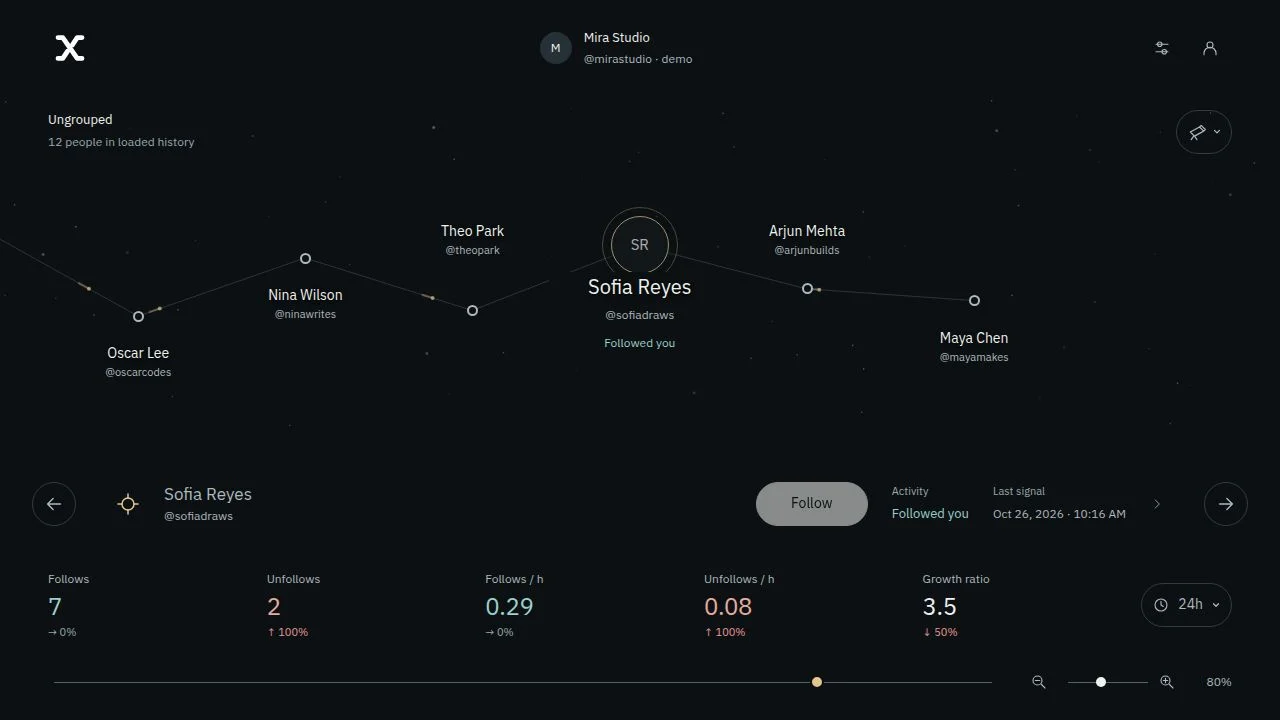
Constellation in the offline demo. The people and events are sample data, not my actual X history.
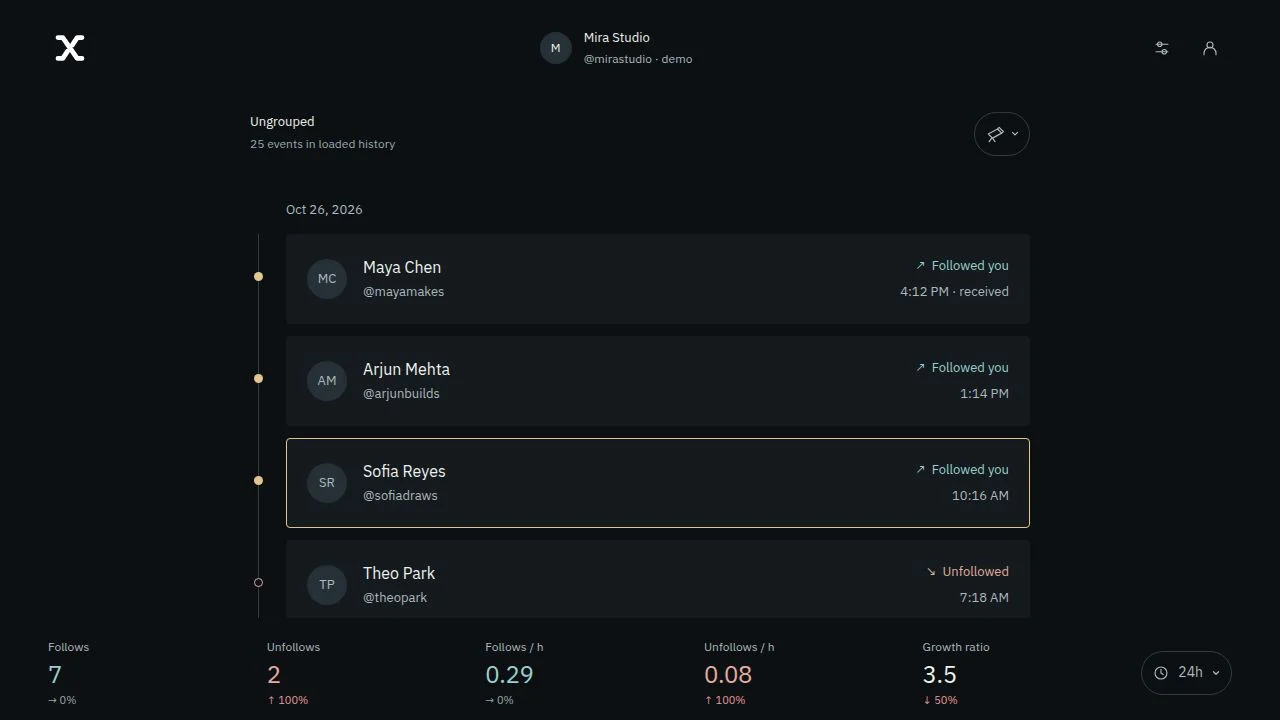
The same kind of history in Journal. Sometimes a list is just the right tool for the job.
And I wasn’t done. I added a shared time range, audience groups for activity and profile context, interaction history, saved conversation threads, post excerpts, optional follow/unfollow actions, notifications and live updates. A person doesn’t need to follow me for us to have interacted, after all.
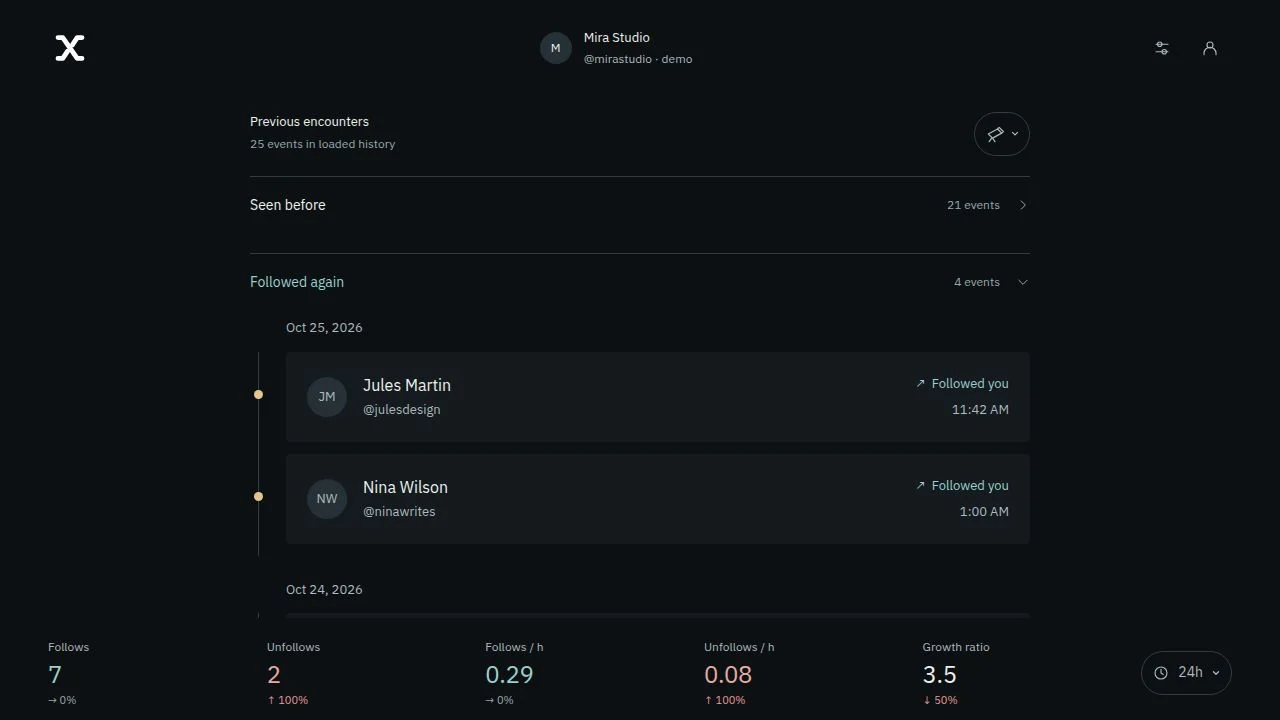
Previous encounters uses the saved history to distinguish a first appearance, someone seen before and a follow after a recorded unfollow. It doesn’t pretend to know why somebody followed or left.
The interface now has to coordinate all of these things. Changing a time range affects multiple views. Selecting an event updates the details panel. Switching a group changes the way the constellation is laid out. New events can arrive while I’m looking at an older one, and the selected event should remain selected instead of jumping to a different action by the same person. The layout has to work on smaller screens too. And I still want the whole thing to feel nice to use, not like a database admin page that got lost in space.
There is a short tour of the current interface below. It uses the offline demo, so you can see the UI without connecting an X account or making API requests.
The existing 25-second XFlog demo tour. Silent, with captions; all activity shown is synthetic sample data.
At some point, this stopped being a small tracker. It became an application for exploring a growing history, and every new feature added another interaction or state for the UI to handle.
And then the UI started getting slow. Really slow.
This is where the fun began. As more history accumulated, moving around the timeline started feeling sluggish. Changing time ranges, moving across the loaded history, zooming in and out… all of it started getting slower than I was comfortable with.
It wasn’t just that the initial page took a little longer to load. The interactions themselves started feeling heavy. I’d change a scale, drag the zoom slider or try to move through a larger timeline and the browser would take its sweet time. At some point I caught myself waiting for the UI to catch up with what I was asking it to do.
My first reaction was, naturally: Gradio!
I mean, I had started with a Python UI framework, and now I was asking it to support a fairly involved interactive application. Maybe this was the point where I was finally seeing the limitations. Gradio and Streamlit are fantastic when I want to get a demo, prototype or data-facing interface running quickly. But was I trying to make one of those do the job of a full frontend application?
That was my initial conclusion. Then I went back and looked at the actual implementation. And, well, I had to correct myself a little. XD
The funny part: I’m barely using Gradio components.
If you open XFlog’s src/xflog/web/ui.py, you’ll find a Gradio Blocks app with essentially one gr.HTML component. That component loads my own shell.html, and the app loads its own JavaScript and CSS assets. The frontend has its own modules for the constellation, layout calculations, journal, live history, activity HUD, interaction controls, profile details and so on.
In other words, the UI is already mostly custom HTML, CSS and JavaScript. Gradio is acting as the wrapper that mounts the page around the FastAPI application. I’m not building the timeline out of hundreds of Gradio sliders, buttons and components and then wondering why the component framework is struggling. I’m rendering most of the actual interface myself.
That changes the diagnosis quite a bit.
I can’t just say “Gradio made my UI slow” and call it a day. The browser is executing my JavaScript, creating my SVG elements, laying out my labels and processing the data I asked it to display. Gradio isn’t responsible for every DOM node I decided to create. If I move the same rendering approach into React without changing anything else, I could very easily carry the same problems over.
So maybe the framework wasn’t the only issue. Maybe I had built a custom frontend inside a framework that I originally chose because I didn’t want to build a separate frontend. That is a slightly different problem. 😄
Looking at my own code was… educational.
I haven’t run a proper browser performance profile against a controlled set of datasets yet, so I don’t want to pretend that I have isolated the one thing responsible for every laggy interaction. But reading through the current code gives me a few places I want to investigate before I start moving things around.
1. Zoom rebuilds the constellation
In the current constellation.js, changing zoom eventually calls setZoom(), which calls render() again. That isn’t just changing a CSS transform or updating a scale value. The renderer recalculates the layout, builds the SVG and HTML markup, replaces the content, finds the new elements and attaches event listeners again.
The zoom slider listens to the input event, so while I’m dragging it, the app can do that work repeatedly. With a small history, this is manageable. With a much larger history, rebuilding the scene over and over is a lot of work for something that should feel immediate.
I might be able to improve parts of this without a full rewrite. For example, some changes could be handled by updating the existing scene instead of recreating it. But that still leaves the broader question of how much of the scene needs to exist in the DOM in the first place.
2. The animation loop has more work as history grows
The constellation has ambient motion: stars, trails, shooting stars and all that. I like it. It makes the timeline feel less like a spreadsheet. But the animation loop also walks through the loaded labels, updates positions, checks which labels should be visible, updates stars and moves the connection sparks.
There are some calculations in there that depend on the full set of loaded people, not just the things currently visible in the viewport. For example, the navigation update counts unique actors from the loaded geometry. That is not something I need to recalculate on every animation frame if the underlying data hasn’t changed.
Again, I haven’t measured the exact cost yet. But I can already see opportunities to cache values, avoid touching off-screen elements and make the animation work proportional to what is actually visible.
3. The layout calculation does quite a bit of searching
The constellation layout starts with the loaded events, groups them and calculates where every point should go. Some of the positioning work repeatedly searches through groups and their people to find the matching group and member index.
That may be fine with a few hundred points. As the collection grows, I should build lookup structures once and reuse them rather than repeatedly searching arrays while laying out every event.
4. All saved means… all saved
The timeline API already uses cursor-based pagination. Each request returns a bounded page, with a continuation cursor for the next one. That’s good. The frontend, however, currently keeps asking for the next page until it has loaded the entire selected range, then merges and sorts the events before rendering them.
That makes sense for the meaning of All saved. I don’t want a view called All saved that secretly shows only the first page. I already had to fix that kind of bug in an earlier XFlog release. But there is a difference between being correct about which records belong in a range and insisting that the browser must load and render every one of them at once.
If I have a long history, I probably don’t need every event fully rendered just to show an overview. I need a way to fetch or calculate the right amount of information for the current view, then load the detail when I move closer to it.
These are not measured performance results. They’re code-level observations and places to profile. I need to separate API time, data transformation, layout calculation, DOM/SVG creation and animation time. Otherwise I’ll just move code from one place to another and congratulate myself for changing the framework. XD
The UI has become its own application.
There is another part of this that isn’t only about raw rendering speed. The amount of state the interface manages has grown too.
Think about the current timeline. It has the selected subject, filter, layout, time range, selected event, selected audience group, demo/live mode, loading state, pagination cursor and live updates. Then there are preferences, the activity HUD, profile details, follow actions and interaction history. Some of those pieces share state, and some have their own lifecycle. Changing one thing can affect several others.
I have tried to keep the JavaScript split into modules rather than stuffing everything into one giant file. The constellation, layout, journal, live history and other controls have their own files. That helps. But the application still has a lot of custom DOM manipulation and state coordination, and it is getting harder to reason about the whole interface as one coherent system.
This is where I started thinking seriously about React and TypeScript. Not because React magically makes things faster, but because I want a more deliberate component model and a better way to structure state and interactions. A timeline, a person detail panel, a time-range picker, a group selector and the activity readings are separate pieces of UI. They should be able to update without making the entire page rebuild itself.
TypeScript is also appealing because I don’t want to keep guessing what shape an event or API response is supposed to have. There are several kinds of timeline events, and the difference between an actor and an event matters. The actor ID tells me who did something; the event ID tells me which action I’m looking at. That distinction has already caused a few interesting bugs in the past. I’d rather make those contracts explicit instead of relying on me remembering them in every new module.
And then there’s Zod. TypeScript types disappear at runtime. They won’t validate whatever JSON comes back from an API. I’d like to validate the important data at the boundary, catch unexpected responses early and then let the rest of the frontend work with known shapes. I don’t need to wrap every little variable in a schema. I just want the network boundary to stop being a trust fall.
The backend isn’t starting from zero either.
When I first thought about a rewrite, I had this image of having to build a whole new backend API layer before React could do anything useful. Then I checked app.py and realised that I already have a fair number of FastAPI endpoints.
There are routes for status, activity summaries, timeline history, preferences, audience groups, interactions, thread snapshots, follow actions and starting or stopping tracking. The current Gradio wrapper mounts the FastAPI app, but the backend services and the API routes are already separate enough that a new frontend can consume them.
So no, I don’t need to throw away the backend and start again. That’s good news. I also don’t think I can just point a React app at the existing endpoints and call the migration finished.
I’ll need to review the response shapes, formalise the contracts, decide which endpoints need to change and probably add a few that make sense for the new interaction model. For example, the frontend may need a more deliberate way to request a time window, get an aggregated overview and then fetch detailed events around the section the user is exploring. The current cursor pagination is useful, but the frontend shouldn’t have to download the entire history just because someone selected a broad range.
The API should serve the UI’s needs without turning into a collection of endpoints that each return whatever the current component happens to want. That’s another thing I’ll have to be careful about. I don’t want to replace one tightly coupled interface with a tightly coupled API.
What I might change in the next version
I haven’t started the rewrite yet. This is still the investigation and planning stage, and I know there is more work here than replacing gr.HTML with a React root. But I have a rough idea of the direction I’d like to explore.
The frontend would be a separate React + TypeScript application. It would talk to FastAPI through a typed API client, with Zod validating the important responses. I’d like to have clearer ownership of state: the selected event, active filters, time range, pagination, loading state and user preferences shouldn’t all be entangled just because they’re visible on the same page.
For the Journal, I want to look at list virtualization so that a long history doesn’t mean thousands of rows sitting in the DOM. For Constellation, I need to test whether a more efficient SVG approach is enough or whether Canvas is a better fit for the dense visual layer. I don’t want to jump straight to WebGL because it sounds impressive. It might be unnecessary. Canvas would also mean I have to think harder about keyboard navigation, accessibility and interactive hit-testing, so it isn’t a free win either. A hybrid approach might make more sense: Canvas for dense stars and connections, normal HTML for labels, controls and selected-event details.
I also want to move more of the expensive work closer to the data layer. If I’m zoomed out, I should be able to see an aggregated overview without rendering every individual action. As I zoom in or move through a time window, the frontend can request more detail. Caching and sensible query windows should reduce repeated work when I switch between the timeline, Journal and readings.
And before any of that, I want a repeatable performance test. Give the app a fixed dataset with 100, 500, 1,000 and 5,000 events. Measure the time to load a range, render the first view, zoom, pan and switch filters. Measure with ambient motion on and off. Then compare the old and new implementations using the same data and the same browser. Otherwise I’m just going to say “feels faster” and call it engineering. We all know how that goes. XD
Was choosing Gradio a mistake?
I don’t think so. At least, not for the version I was trying to build at the time. It helped me get a working interface quickly, and that was the right priority when XFlog was a much smaller tool. I could validate the idea, use it myself and add features without spending a lot of time on frontend infrastructure.
The mistake, if I want to call it that, was assuming that the same approach would remain convenient as the product kept growing. I kept adding interactions, visualisation and data exploration features, but I didn’t stop to reconsider whether the UI architecture was still the right fit. I was treating frontend architecture as something I could postpone indefinitely because the backend and the data model were the interesting bits.
Turns out, the UI is not just the place where the backend results are displayed. Once it has complex navigation, shared state, timelines, live updates and thousands of records to explore, it becomes a substantial part of the application architecture too.
And one more thing: I don’t want to turn this into a “Gradio bad, React good” post. Gradio wasn’t the only thing in the current stack, and it isn’t the only thing I need to fix. The custom JavaScript renderer, the amount of data loaded, the layout algorithm and the animation loop all deserve attention. A React rewrite that copies those same decisions would just give me a newer way to make the browser suffer.
For now, XFlog is still running on the existing implementation. I haven’t started replacing the frontend, and I haven’t measured a before/after improvement. I just know that the application has grown beyond the shape I originally designed for it, and I need to give the UI the same architectural attention I’ve been giving the backend.
I guess that’s another lesson from building things: sometimes the feature you keep adding is not the next thing you need. Sometimes you need to stop, look at what you’ve built, and admit that the foundations need a rethink.
Well, at least I have an excuse to play with React, TypeScript and Canvas now. Let’s see how many more things I manage to break on the way. XD